Vibecoding in Practice: Building SortDocs with AI
A while ago, I started experimenting with vibecoding — building software by relying mostly on AI prompts instead of manually writing every part of the code.
My first experiment was playful: a small multiplayer 3D prototype. It was useful mostly because it showed me both sides of the workflow: AI could get me surprisingly far, but it could also break things just as quickly.
This time, I wanted to try the same mindset on something more practical.
Not a demo.
Not a toy.
A tool I could actually use.
That’s how sortdocs was born.
👉 https://github.com/davdifr/sortdocs
The Idea
Like many people, I have folders that slowly turn into chaos.
Downloads, PDFs, markdown notes, screenshots, scanned documents, text files — everything accumulates in the same place until finding anything becomes annoying.
So the idea was simple:
Could I build a tool that organizes local documents safely, using AI to understand what the files actually are?
That last part mattered a lot.
I did not want a sorter that only looks at file extensions. I wanted something that could make better decisions by using a mix of:
- file content
- metadata
- AI-powered classification
That requirement shaped the whole project.
What SortDocs Actually Does
At a high level, the workflow is intentionally simple:
- Move into the folder you want to organize
- Run
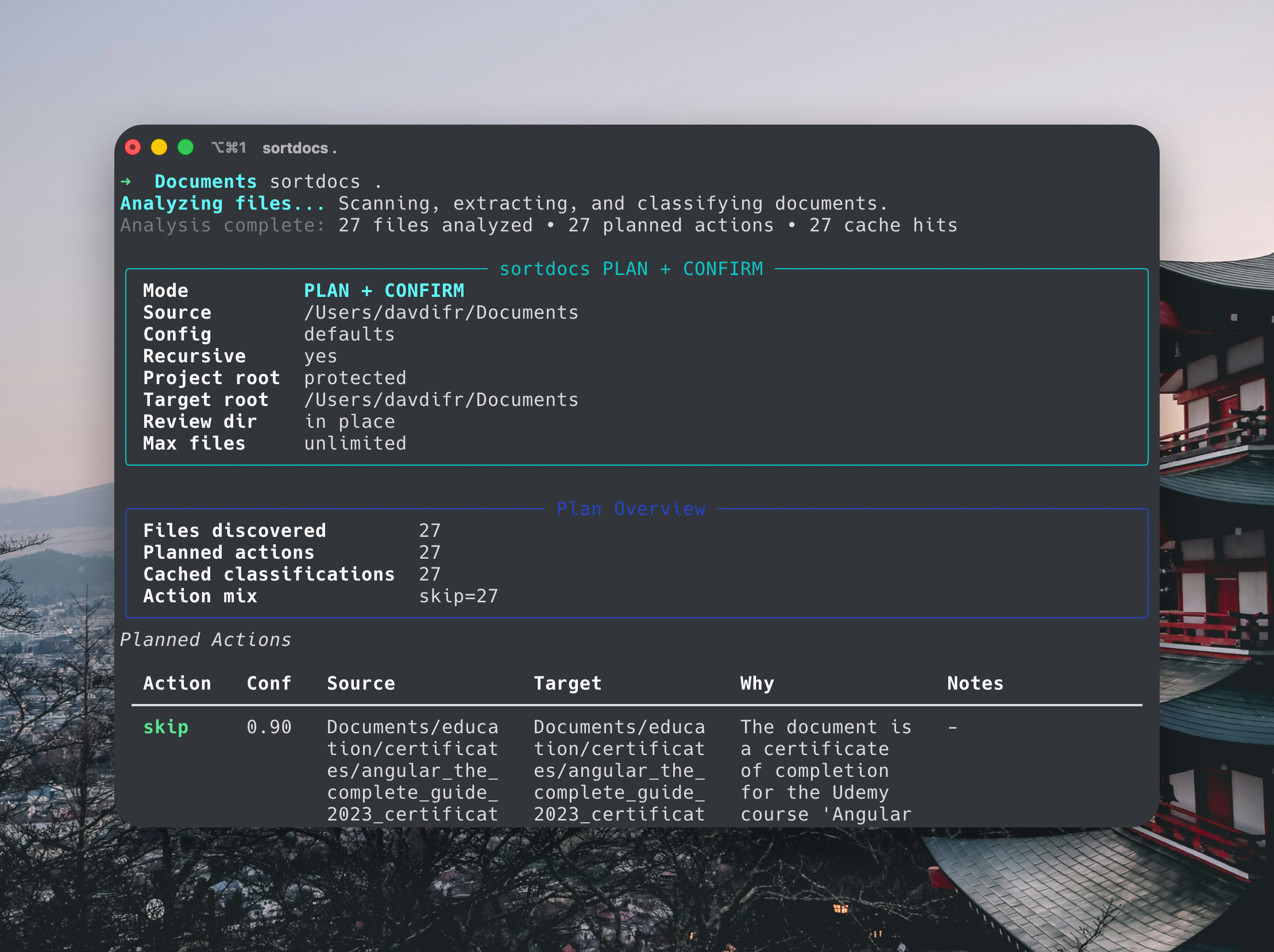
sortdocs . - Let the tool scan recursively and build a plan
- Review the plan
- Confirm the changes only if they make sense
That “plan first, apply second” approach was one of the most important parts of the project.
I didn’t want an AI tool making filesystem changes without showing its reasoning through actual proposed actions.
First Look at the CLI
Here’s what the CLI experience looks like when running a scan and reviewing the plan:
Why This Was a Better Vibecoding Test
Compared to my earlier vibecoding experiments, this project felt more realistic from the start.
A game prototype is fun, but a document organizer forces you to deal with more practical concerns:
- safe file operations
- ambiguity
- naming collisions
- bad input data
- project folder protection
- repeat runs
That made it a much better test of whether AI could help build something I would genuinely trust on my machine.
And trust was the key word here.
Starting with the CLI
I started from the smallest useful version: a terminal command that could analyze a target folder and propose actions.
Very early on, the shape of the product became a CLI instead of a full UI-first app. That choice made iteration faster and kept the project focused on the core pipeline:
scan → extract → classify → plan → execute
A CLI removes distractions. If the core logic works there, everything else can come later.
The Core Challenge: Understanding Files, Not Just Extensions
One of the most interesting parts of sortdocs is that it is not meant to be a dumb file sorter.
A .pdf could be:
- an invoice
- a manual
- a contract
- a scanned document
- or something with almost no readable content
So the problem was never just “where should .pdf files go?”
The real question was:
How can the tool infer a reasonable destination from incomplete evidence?
That led to a more layered approach:
- extract what can be extracted
- use metadata where useful
- classify with AI
- lower confidence when evidence is weak
- fall back conservatively
If the tool is uncertain, it should become more careful, not more creative.
Building Guardrails Early
This was probably the most important lesson of the whole project.
When you let AI help build a tool that touches the filesystem, guardrails are not a polish step. They are the product.
SortDocs includes:
- confirmation before applying changes
- rename and extension safeguards
- collision handling
- project-folder protection
- ignore rules
- conservative fallback behavior
This is where the project stopped feeling like a prototype and started feeling like real software.
Project Folder Protection
One feature I particularly like is protecting software projects by default.
If the root folder looks like a project, the tool blocks execution. Nested project folders like Git repos, node_modules, .venv, dist, and build are skipped automatically.
If the user really wants to run it anyway, they must explicitly opt in.
This is a small detail, but it says a lot about the philosophy of the tool:
It prefers being safe over being clever.
Improving Repeat Runs
Another important aspect was handling repeated usage.
Many prototypes work once but break in real-world scenarios.
SortDocs adds:
- local memory to improve consistency
- incremental cache for unchanged files
- automatic invalidation when configs change
This means unchanged files can skip processing entirely on later runs.
Less flashy than AI — but much more useful.
Onboarding Matters More Than Expected
One thing I’ve learned is that onboarding often matters more than the core logic.
If the OpenAI API key is missing, the tool:
- shows a guided setup
- allows pasting the key directly in the terminal
- explains how to generate it
- optionally saves it locally
Without this, it feels like a repo.
With it, it feels like a product.
The Optional GUI
Originally, the project was CLI-first.
Later, it evolved into an optional macOS GUI using PySide6.
Here’s a preview of the GUI showing the planned actions before applying changes:
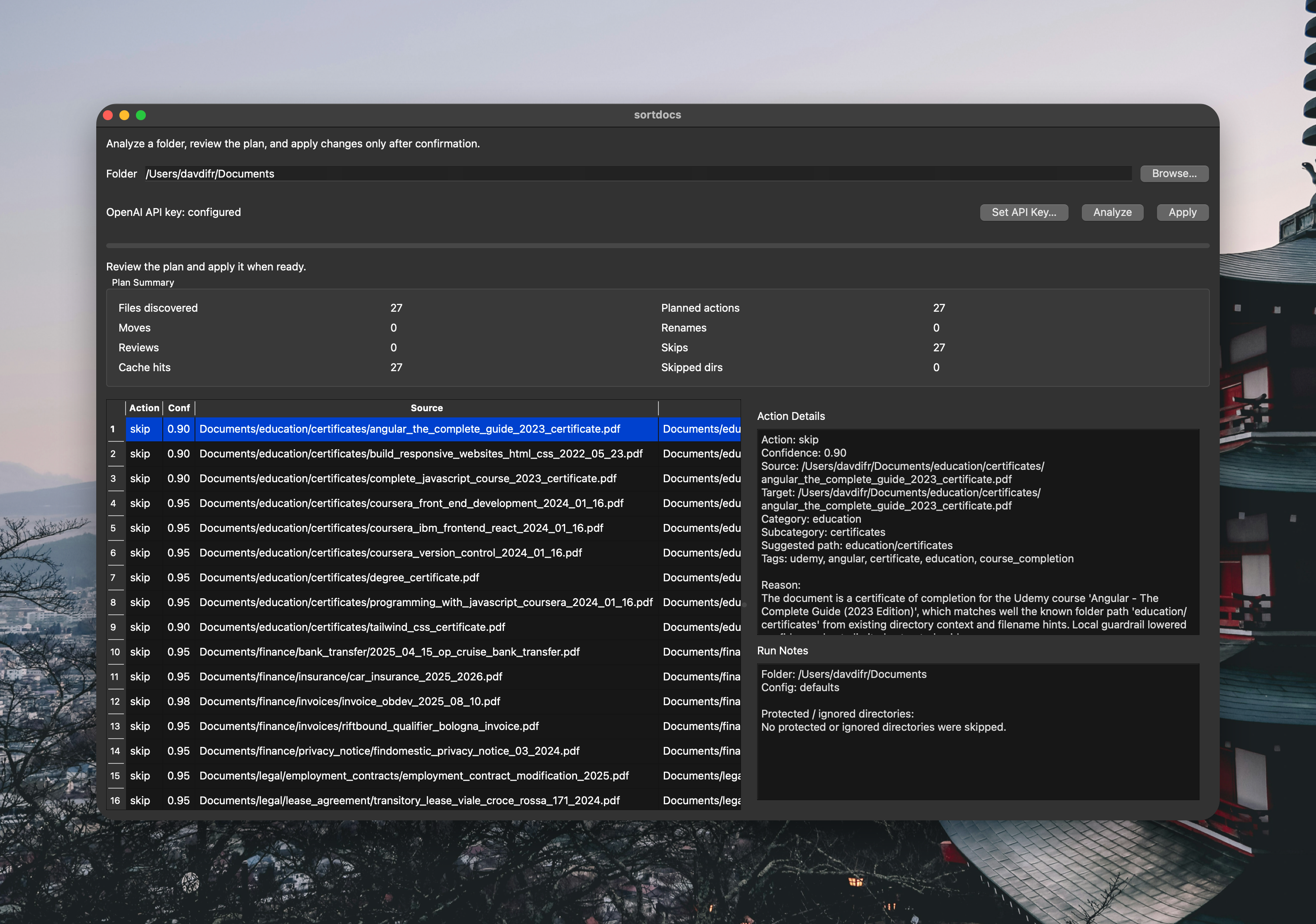
The GUI includes:
- folder selection
- API key setup
- live analysis progress
- preview of planned actions
- detailed decision view
- confirmation before applying changes
The CLI is still the core, but the GUI makes it more approachable.
Where Vibecoding Helped the Most
AI was especially helpful for:
- scaffolding the CLI
- iterating on logic
- handling edge cases
- improving UX flows
- speeding up repetitive work
The biggest gains came from using it on small, well-defined problems, not from asking it to build everything at once.
Where It Still Needed Direction
AI still needed strong guidance on:
- how conservative the tool should be
- how to handle uncertainty
- acceptable risk levels
- product decisions
These are not coding problems. They are product decisions.
AI accelerates implementation — but it doesn’t replace judgment.
Final Thoughts
SortDocs ended up being a much better vibecoding experiment than I expected.
Not because it’s complex.
But because it’s useful.
It forced me to focus on something more important than generation:
reliability.
At this point, I don’t see vibecoding as “letting AI build everything.”
I see it as collaboration:
- I define constraints
- AI accelerates implementation
- I guide the decisions
- safety defines the quality
SortDocs is probably the clearest example I have so far of that balance.
It started as an experiment.
It became a real tool.
And more than anything else, it showed me this:
AI is most useful when paired with strong guardrails — not blind trust.